> For the complete documentation index, see [llms.txt](https://docs.caf.io/llms.txt). Markdown versions of documentation pages are available by appending `.md` to page URLs; this page is available as [Markdown](https://docs.caf.io/caf-docs/user-guide/organizations/scim-provisioning.md).
# SCIM Provisioning
Configure SCIM user provisioning for your organization in Organizations.
**SCIM** (System for Cross-domain Identity Management) lets your identity provider provision **members** into Organizations before they sign in with SSO. Use it when user lifecycle (create, update, deactivate) must be controlled centrally in your corporate directory.
{% hint style="info" %}
Organizations supports **inbound SCIM 2.0 user provisioning only**. Your identity provider pushes users to Organizations — Organizations does not provision users back into your IdP. **Group provisioning via SCIM is not supported.**
{% endhint %}
***
## SSO only vs SSO + SCIM
| Mode | SCIM token | Member creation | Group membership |
| -------------- | ------------- | --------------------------------------------------------------------- | -------------------------------------------------------- |
| **SSO only** | Not generated | Automatic on first SSO login (JIT) | **Group assignment rules** or manual assignment |
| **SSO + SCIM** | Active | Identity provider provisions the user via SCIM **before** first login | Managed in Organizations (SCIM does not sync IdP groups) |
Access the [SSO Configuration Guide](/caf-docs/user-guide/organizations/sso-configurations.md) for federation setup and the [Member provisioning](/caf-docs/user-guide/organizations/sso-configurations.md#member-provisioning) section for first-login behavior.
***
## Prerequisites
* **Super Admin** access in the Organizations admin console
* **SSO configured and active** — SCIM relies on SSO for member authentication
* Administrator access to SCIM provisioning in your identity provider (Okta, Microsoft Entra ID, Google Workspace, or another SCIM-capable provider)
***
## Recommended order
1. Complete [SSO configuration](/caf-docs/user-guide/organizations/sso-configurations.md) and confirm status **Active**.
2. Create **groups** in **People** → **Groups** if you assign access by group membership.
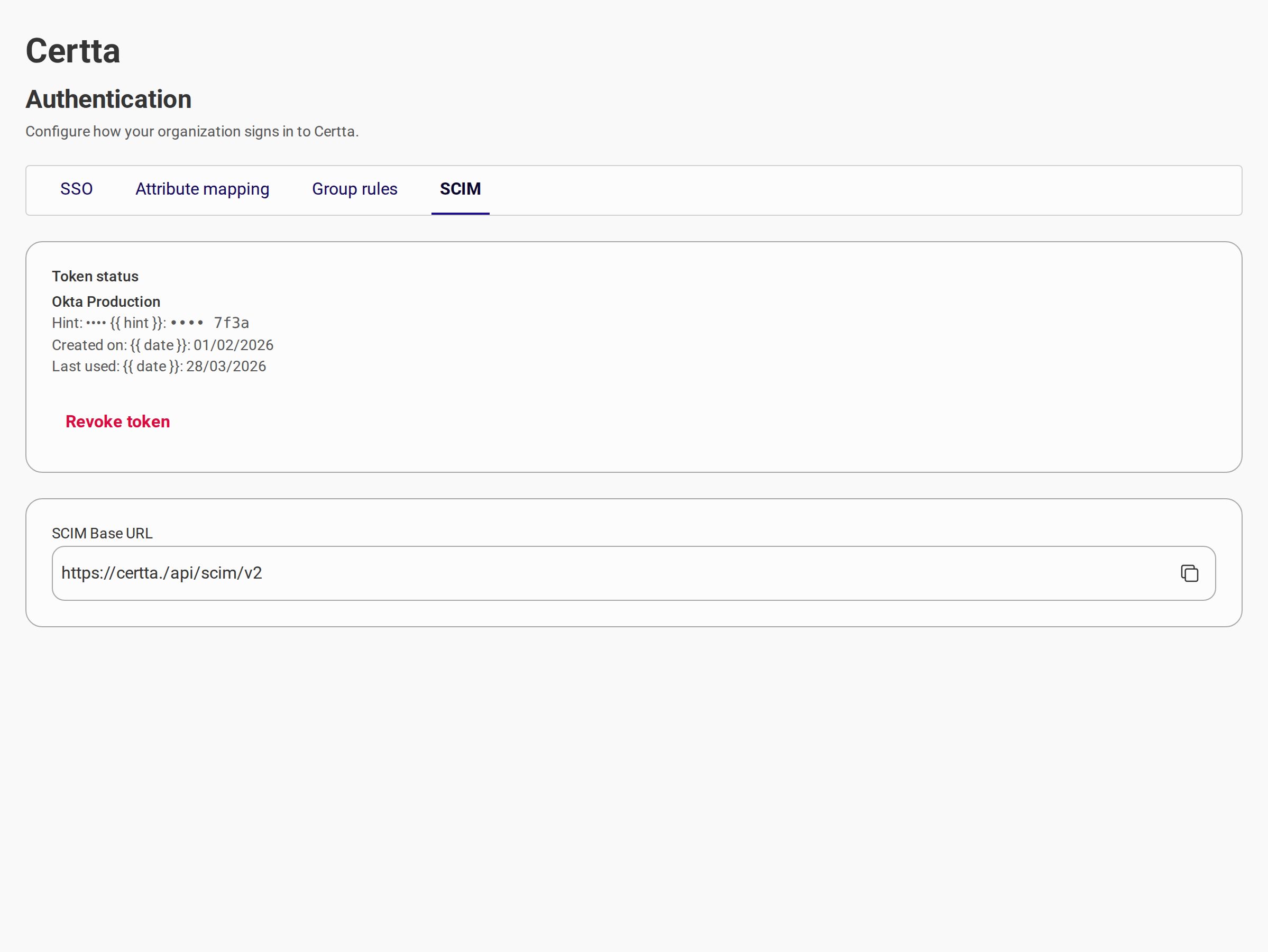
3. Generate a SCIM bearer token and copy the **SCIM Base URL** (this guide).
4. Configure SCIM in your identity provider.
5. Provision a test user via SCIM.
6. Verify the member appears in **People** → **Members**.
7. Test **Sign in with SSO** as that member at your organization URL.
***
## Step 1: Generate a bearer token
1. Sign in to the admin console as a **Super Admin** at `https://{your-alias}.sso.caf.io/admin-login`.
2. Open **Security** → **SCIM**.
3. Select **Generate token**.
4. Enter a **token name** (for example, `Okta Production`) and confirm.
5. Copy the token immediately — it is shown **once** and cannot be recovered later.
{% hint style="warning" %}
Store the bearer token securely. Treat it like a password. Only **Super Admins** can generate or revoke SCIM tokens.
{% endhint %}
***
## Step 2: Copy the SCIM Base URL
On the same **SCIM** tab, copy the **SCIM Base URL**. It follows this format:
```
https://{your-alias}.sso.caf.io/api/scim/v2
```
Use this URL as the SCIM endpoint base in your identity provider. User resources are available at:
```
https://{your-alias}.sso.caf.io/api/scim/v2/Users
```
***
## Step 3: Configure your identity provider
Each provider exposes SCIM under different menu names (**Provisioning**, **Automatic provisioning**, **SCIM provisioning**, etc.). Configure:
| Setting | Value |
| ---------------------- | ---------------------------------------------------------- |
| **SCIM Base URL** | URL copied from Organizations |
| **Authentication** | Bearer token (HTTP header `Authorization: Bearer {token}`) |
| **Provisioning scope** | Users only |
### Supported user operations
| Operation | SCIM endpoint | Description |
| --------------- | ------------------- | ------------------------------------------------ |
| Create user | `POST /Users` | Pre-provisions a member awaiting first SSO login |
| Replace user | `PUT /Users/{id}` | Updates member attributes |
| Deactivate user | `PATCH /Users/{id}` | Deactivates the member (`active: false`) |
| List users | `GET /Users` | Lists provisioned members |
| Get user | `GET /Users/{id}` | Returns a single member |
Discovery endpoints (`/Schemas`, `/ResourceTypes`, `/ServiceProviderConfig`) are available for providers that request them during setup.
### Typical user attributes
| SCIM attribute | Description |
| ----------------- | ---------------------------------- |
| `userName` | Primary identifier (usually email) |
| `emails` | Email address (primary) |
| `name.givenName` | First name |
| `name.familyName` | Last name |
| `displayName` | Full display name |
| `active` | Whether the user is active |
The email address used in SCIM must match the email your identity provider sends during SSO authentication.
***
## First SSO login after SCIM provisioning
When SCIM is active, the member lifecycle works as follows:
1. The identity provider sends `POST /Users` — Organizations creates a member with status **pending identity assignment**.
2. The member selects **Sign in with SSO** at `https://{your-alias}.sso.caf.io`.
3. After successful authentication at the identity provider, Organizations links the federated identity to the SCIM-provisioned member.
4. The member status becomes **active** and the session starts.
If the user attempts SSO **before** SCIM provisioning, login is blocked with **Account not yet provisioned**.
***
## Revoke a token
1. Open **Security** → **SCIM**.
2. Select **Revoke token** on the active token.
3. Confirm revocation.
The identity provider loses access immediately. SCIM sync stops until you generate and configure a new token.
***
## Troubleshooting
| Problem | Probable cause | Solution |
| ---------------------------------------------------- | --------------------------------------------- | -------------------------------------------------------------- |
| Account not yet provisioned (member login) | User not created via SCIM | Provision the user in your IdP SCIM app before first SSO login |
| SCIM sync fails (401/403) | Invalid or revoked token | Generate a new token and update the IdP configuration |
| User created in IdP but not in Organizations | Wrong SCIM Base URL or token | Verify URL and bearer token in the IdP |
| SSO works without SCIM but fails after enabling SCIM | User missing from SCIM | Provision all SSO users through SCIM while a token is active |
| Duplicate or missing email | `userName` / `emails` mismatch with SSO claim | Align SCIM email with the **Email** attribute mapping in SSO |
| Groups not syncing from IdP | Group SCIM not supported | Assign groups manually in **People** → **Groups** |
***
## Related documentation
* [Organizations overview](/caf-docs/user-guide/organizations.md)
* [SSO Configuration](/caf-docs/user-guide/organizations/sso-configurations.md)
* [Member provisioning (SSO)](/caf-docs/user-guide/organizations/sso-configurations.md#member-provisioning)
---
# Agent Instructions
This documentation is published with GitBook. GitBook is the documentation platform designed so that both humans and AI agents can read, navigate, and reason over technical content effectively. Learn more at gitbook.com.
## Querying This Documentation
If you need additional information that is not directly available in this page, you can query the documentation dynamically by asking a question.
Perform an HTTP GET request on the current page URL with the `ask` query parameter, and the optional `goal` query parameter:
```
GET https://docs.caf.io/caf-docs/user-guide/organizations/scim-provisioning.md?ask=&goal=
```
`ask` is the immediate question: it should be specific, self-contained, and written in natural language.
`goal` is optional and describes the broader end goal you are ultimately trying to accomplish on behalf of the user. GitBook uses it to tailor the answer towards what is most useful for that goal.
The response will contain a direct answer to the question and relevant excerpts and sources from the documentation.
Use this mechanism when the answer is not explicitly present in the current page, you need clarification or additional context, or you want to retrieve related documentation sections.